- Company
- Studio Dalkeith - client work for a Buffalo law firm, via Radial Ventures
- Role
- Product Designer - design review, design system and the front-end build
- Duration
- About 25 hours over three weeks
- review findings, all symptoms of weak fundamentals
- 19
- design decisions, each logged with its reason
- ~100
- contrast on form field borders
- 1.34 -> 3.34:1
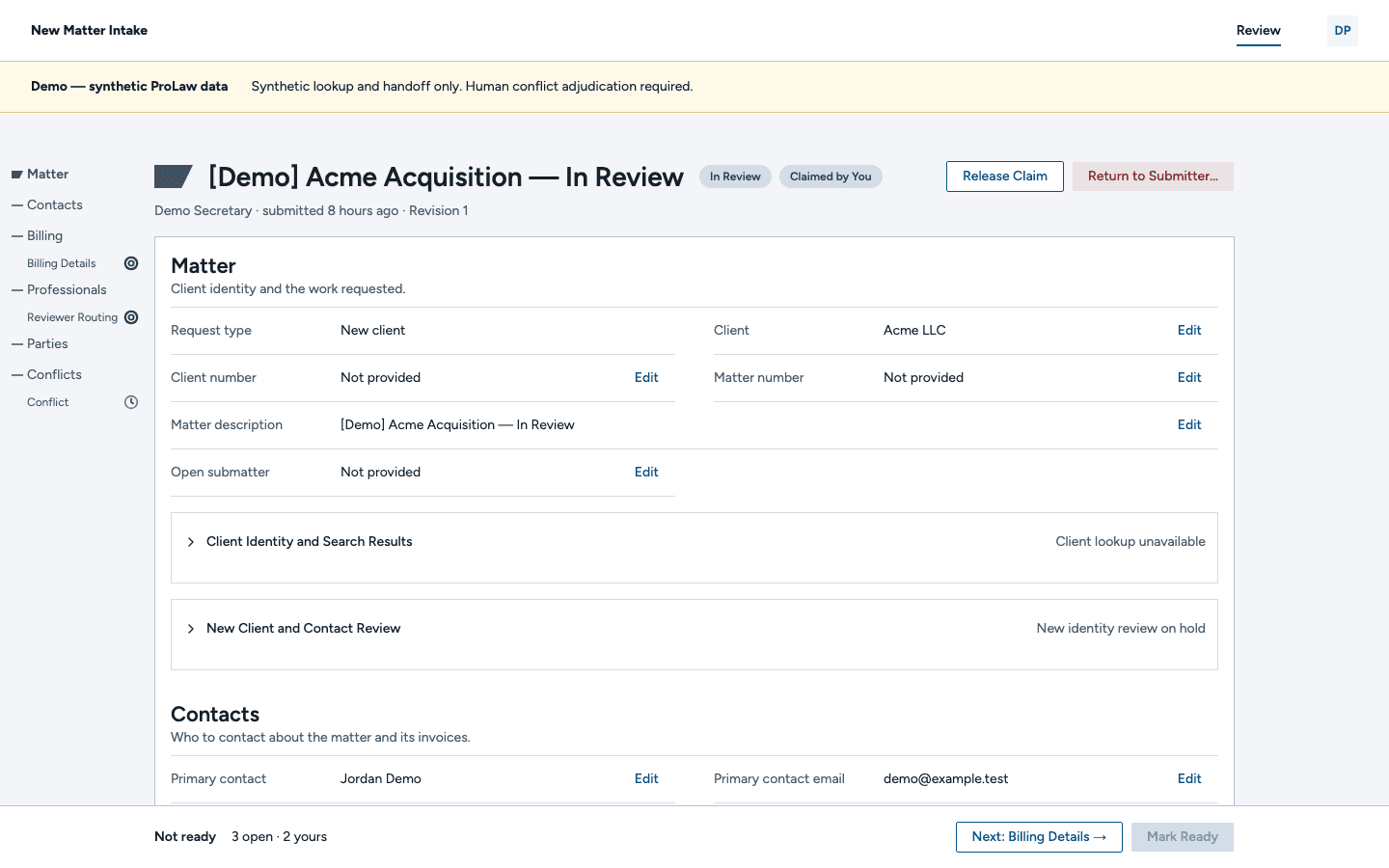
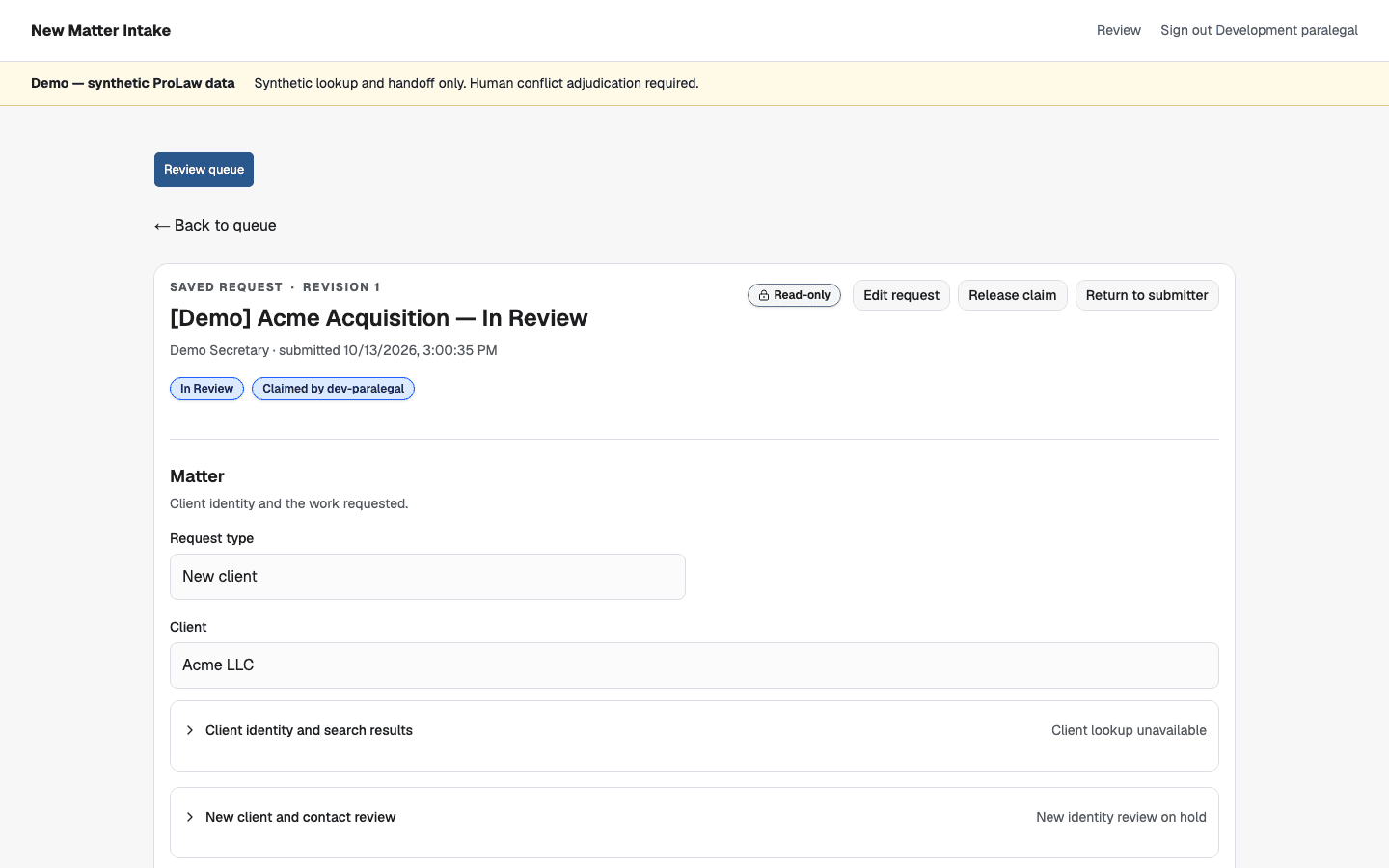
Radial Ventures brought me in to fix the front end of an intake app they were building for a Buffalo law firm. Two backend-leaning engineers had built it with Claude, and the brief, in Noah's words, was "Please help us fix this. Right now it looks like Claude made it and made it badly." After my design pass rebuilding the fundamentals, mining ideas from the firm's marketing website, and about 100 back and forth decisions with AI later, it looks like the firm's own software and reads like a purpose built tool for the paralegal who uses it all day.
The Challenge
At this law firm, new Matters (an industry term) arrive at the firm by phone or email. A secretary types each one into a form, then a paralegal retypes it into the firm's 2000s-era case system and runs conflict checks by hand. This process is, of course, manual and error prone, but just as importantly it's labor intensive and the exact type of work the paralegals hate doing. Radial's app takes the retyping away: secretaries submit a request, the app runs the lookups in the background, and the paralegal reviews the flags in a queue and approves. She enters about 20 Matters an hour, so a speed up in one task gets multiplied.
The Process
At a glance the app looked good, which is normal for AI output. It takes a second look and a careful eye to find where it falls apart. A lot of ink has been spilled on fixing AI slop and, as with all things, there's no shortage of snake oil salesmen selling the perfect fix. But AI models have one input: text. They're trained by reward, which is also what makes them sycophantic, so by default they build toward whatever vision is in that text. Theory aside, that has a few practical applications when you're working on a project where the front end feels a little sloppy. Two engineers with no designer involved had never put a design vision in, so the app had none. What was missing was a dedicated design pass, which is why they hired me, and a focus on fundamentals. Watch any post-game interview in sports and you'll hear the coach talking about fundamentals. Product design is no different. When in doubt, start with layout, typography, and color, with accessibility as a through line tying everything together.
Starting from those fundamentals, I used my personal design review skill to have Claude and GPT look for findings and categorize them into groups, checking each other's work. Brad Frost's atomic design is how I make sense of a list like that, and this one had problems at every level, from atoms like shadcn's default buttons, which are weaker than the Antd-based ones I'm used to, up to the shared navigation. Then I built a visual side-by-side comparison and went through each finding. We ended up with ~100 changes ranging from a new color system to text alignment. Afterwards, I went section by section and built a PR for the entire set of changes so our team could interact with the changes live as I went through them.

Key Decisions & Rationale
-
Only one way back. The original version Claude built had 4 (!!) ways to get back to the review queue, making it a sort of "choose your own adventure" experience. There was only really one layer of navigation, so I chose to consolidate everything to the navigation at the top, mirroring the marketing site and saving us a ton of vertical real estate which is always precious.
-
The paralegal should never have to hunt for what's left. A typical request with three things to review had them sprinkled into the four page-long form with only a generic "not ready" summary at the bottom. I took two approaches to fix this. First, I added a DocuSign-style sticky footer that tells you exactly what's next and clicking it scrolls you exactly to where you need to review. Second, I took inspiration from developer IDEs and from Claude Desktop and added a "minimap," or outline component, on the side. This helped give a sense of structure and placement in the form as it scrolled while also highlighting action items with the same click-to-scroll behavior.
-
Don't overload meaning on to color, particularly for common actions. On the paralegal's workbench, red was overloaded to mean four different things: something to review, something to assign, something waiting on someone else, and something the system had blocked. As a result, everything looked like an emergency. Each state now has its own icon and label: "needs you" in dark brand blue, "waiting on others" in grey, "done" in green, and "blocked by the system" in red. Every color is tested in grayscale and for color blindness, and form field borders went from 1.34:1 contrast to 3.34:1 so a 48-field form doesn't fade into the page.
Just a note to remember the WCAG golden rule: color shouldn't be the only visual signal of a state. Always add a second signal like differentiating icons, shapes, or patterns, and check colorblindness and grayscale checkers.
-
Use the marketing (or other brand guidelines) for inspiration. As the line often credited to Pablo Picasso goes, "Good artists copy, great artists steal." It's a perfect metaphor for referencing the marketing website and stealing the best parts but leaving what doesn't make sense. Product has different needs than marketing so, while I took the font, the brand blue, and the slate, I used a calmer perfect fourth font scale (28, 22, 16, 14, and 12px) on an 8px grid. From those initial colors, I generated full palettes from the blue and the slate on one OKLCH lightness grid and used the slate palette as the site's neutral so every grey is tinted with the brand. Then I translated an angled cut motif to use as an indicator element.


Outcomes
"Damn dude, what a facelift."
Noah Harris, Managing Director, Radial Ventures
"Much more readable and navigable."
Adam Guenther, Build Lead, Radial Ventures
Reflection
I told Noah this would take under ten hours. It took more than twice that, because the more you know, the more you find, and the findings file was only the start of the process. It's also important to be wary of rabbit holes that AI will take you down. Early on I said we weren't adding the brand's yellow as an accent, and later Claude read that and tried to rip out the amber warning because it was yellow. Like I said, an AI's only input is the context we give it, so be diligent and give it the highest quality context you can!