- Company
- Arovy (formerly Sonar) - B2B SaaS, Salesforce security
- Role
- Staff Product Designer - designed and built the engine; engineering took it to production
- Duration
- About 12 weeks, from spike to release
- to paint the same 351-object graph
- 50s -> 2.4s
- on our largest tenant, 3,314 objects
- 120 fps
- critical bugs in the old engine, found and fixed on the way
- 2
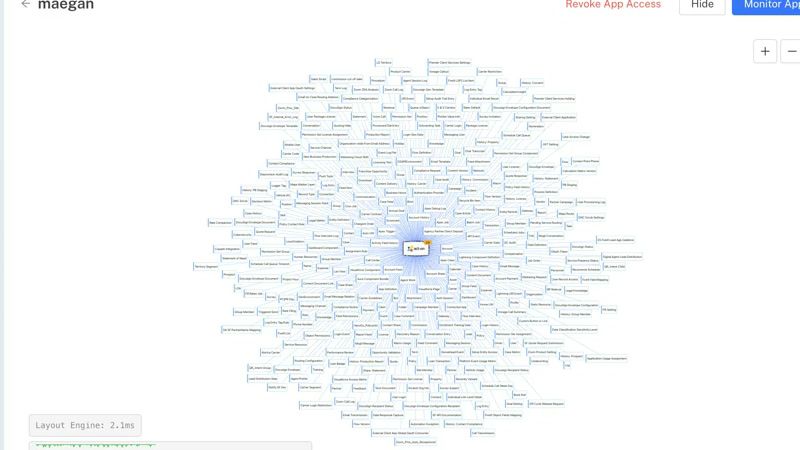
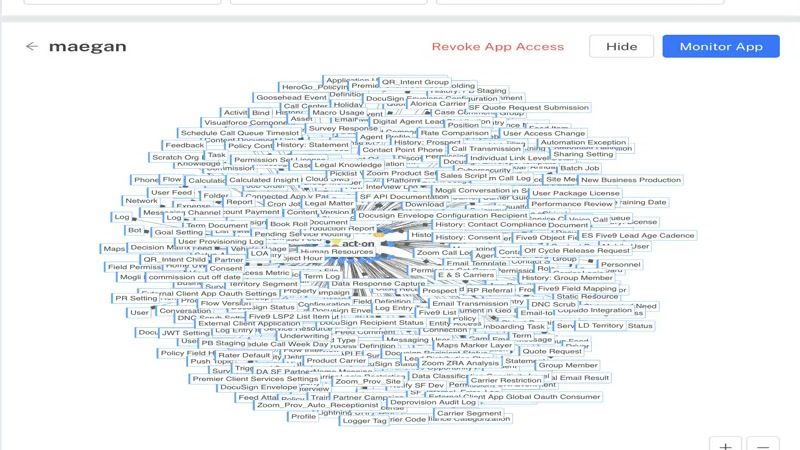
At Arovy, I designed and built a custom graph engine to replace the third-party library behind our Application Overview. On the same 351-object graph, the old engine took about 50 seconds to paint an unreadable hairball, while the new engine displays a clean layout in about 2.4 seconds and renders at 120 fps.
The Challenge
Sometimes the results of a project sell themselves, as was the case with this bespoke graph engine replacement project. Earlier in the year, our telemetry notified us that a customer had 351 applications connected to Salesforce, which exceeded our performance threshold for the number of nodes in our dashboard graph. Engineering had deferred further optimization, and the time had come to fix it.
The Background
We originally added this graph back in 2024 as part of a dashboard overhaul, and we used the "standard method" ™ back then: we surveyed graphing libraries, found one of the very few that had all the qualifications for this specific type of graph, and accepted the step back in visual fidelity from the mock. Engineering built it for the customers we had then, and by 2026 the cracks had begun to show. Engineering's first move was upgrading to the newer AntV release which promised performance improvements. We found the upgrade also removed the layout we relied on and, after a month of effort, engineering hadn't found a viable path forward that didn't require a months-long looming investment.

The Solution
In May, I watched Google I/O and saw them claim the new Gemini model was exceptionally good at physics problems which helped it make games. Having read the AntV code, I knew our graph was basically a physics simulation: forces and gravity pulling nodes into place. I ran a spike and gave Gemini the business problem, the interactions, and our technology stack, including a 500-node "death star." The initial results were stunning, but naturally had lots of gotchas. It took a full 2 weeks and bringing in Claude and Codex as well, but by the end of the sprint I had a prototype that looked much closer to the 2024 Figma design, ran at 120 fps, and painted that 351-object graph in about 2.4 seconds (2.1 ms of it in layout). I spent the next sprint integrating the code directly in our codebase, and then an engineer was able to take the PR with 30k lines of code and push it to production.
Since AI wrote most of this code, reviewing it mattered as much as building it. At the beginning of the process it was important to allow the model to check its work visually, comparing it to the Figma prototype. After the code was written, I used a custom review skill with models from each AI Lab (Codex from OpenAI, Gemini from Google, and Claude from Anthropic) combing the code looking for problems. That step is important because models from different companies are trained on different data and miss different things. On this project the reviews caught two critical bugs, and both were in the old engine every customer was already using: a filter that hid every app, and a spinner that never stopped for customers with no apps. I fixed both before the new engine shipped.
Key Decisions & Rationale
Our small customers shouldn't have a degraded experience to pay for our largest ones. At 3,314 objects, hovering a card dropped the graph to a crawl. Measuring traced it to a CSS scale animation repainting thousands of cards. So I made the decision to switch off hover effects above 400 objects, preserving the rich interaction for all but a handful of our customers.
Nothing can overlap. Graphin's hairball was mostly labels on top of labels, so the new engine treats zero overlap as a guarantee instead of simply a style choice. A review found groups overlapping in 31 of our 33 test layouts and cards in about a quarter of them, so I prototyped two fixes for each and measured both. The winners came out clean in every test and kept the organic look, while the runners-up either made the graph up to 1.8 times larger or kept nudging cards back and forth without ever settling.
Reflection
Even though this was on the dashboard, I underestimated the impact it would have on people. It was mentioned on almost every call I had with a current customer, even months after it went live. I had struck a chord! You might ask why we kept the hairball at all, when 3,000 objects is clearly hard to read. I prototyped a couple different ways to hide and progressively disclose the data, but when I tested it with them they liked the hairball. Our customers constantly feel like they're proving to their boss how hard their job is, how much is connected to Salesforce, and how easily a stray change breaks something across the system. The hairball shows exactly that. I'd have designed it away if we hadn't asked, and it goes to show how valuable research can be compared to just designing in a vacuum.